

You’re likely hearing "Gemini" everywhere, but don't let the name game confuse you. Is it a chatbot, a world-class large language model (LLM), or an agentic suite?
The answer is "yes."
At its core, Gemini 3 is the intelligence layer woven into the entire Google ecosystem, moving beyond a standalone destination to become a collaborator with contextual intelligence. This means Gemini isn't just a generic AI — it’s an expert with "local" knowledge that understands your specific BigQuery data schemas and your private code repositories.
At Promevo, we’ve partnered with our Customer Engineering team to create this crash course, breaking down how this universal brain serves every corner of your business.
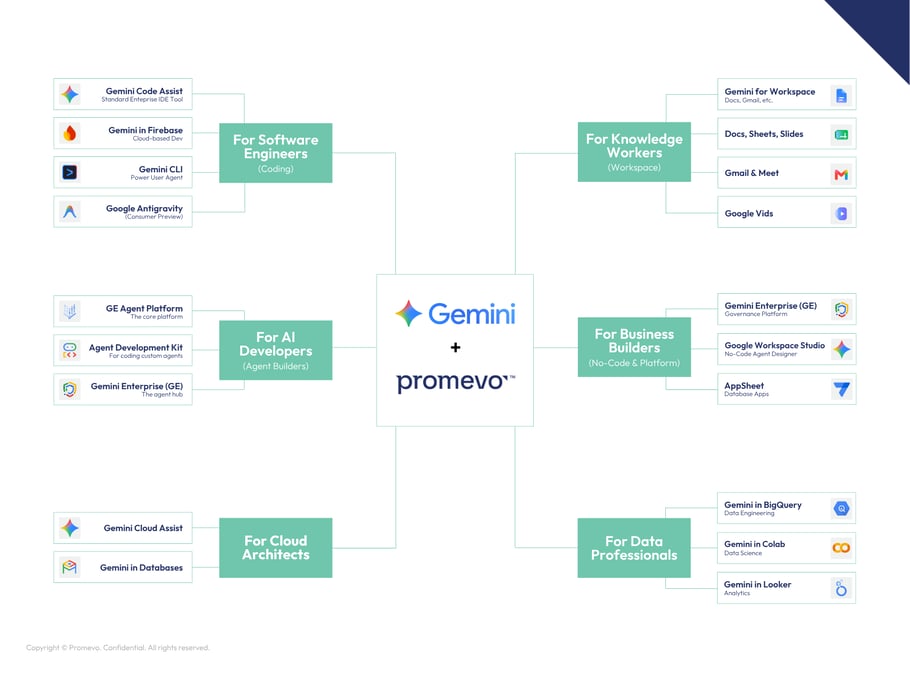
Knowledge Workers: The Creative Partner Baked into Workspace
For the average employee, Gemini acts as a creative partner. Gemini for Workspace is the umbrella term for AI across Google’s productivity apps. It’s no longer a bolt-on feature but is integrated directly into the core Workspace apps you use daily to reduce manual toil and "blank canvas" barriers.
Let’s break down how to use Gemini within each Google Workspace app, from Docs to Gmail and Meet.
Gmail & Docs: Intelligent Writing
Gemini eliminates the "blank page" hurdle by acting as a high-speed drafting partner across your most-used communication and documentation tools.
- Accelerated Drafting: "Help me write" generates instant first drafts from simple prompts. In Docs, this includes intelligent editorial suggestions to restructure long reports. In Gmail, Gemini pulls context from your Google Drive files to summarize data points and include them in a response.
- Tone & Polish: Transform the "vibes" of your writing with a single click. Instantly refine a casual note into a professional executive summary or polish a rough list of bullets into a formal press release.
- Smart Coordination: In Docs, automatically insert "Smart Chips" to link live data — like project stakeholders, Google Calendar events, and file locations — directly into your text, keeping your documents dynamic and connected.
- Thread & Doc Summarization: Stop wading through "Reply All" chains or 30-page briefs. Catch up in seconds with Gemini’s concise bulleted summaries of long email threads in Gmail and executive recaps in Docs.
Sheets: Analyst Power Without Bottlenecks
Gemini in Sheets enables more stakeholders to work directly with their data, dramatically reducing reliance on specialized analysts for exploratory questions.
- "Help me organize": Automate data classification and table generation. For instance, you can prompt Gemini to "Create a social media tracker for marketing" or "Create a table for a team event," and it will build the structure for you.
- Enhanced Smart Fill: Gemini detects patterns in your data and automatically suggests values for incomplete columns, accelerating manual data entry.
- Natural Language Analysis: Ask Gemini questions about your data in plain English, such as "Identify trends in this table" or "What analysis can you help me perform with this sheet?"
- Chart Generation: Generate charts and graphs from your data using natural language commands, such as "Make a line chart analyzing my expenses."
Slides: Impactful Visual Storytelling
Instead of manually searching for stock images, Google Slides users can now prototype visual narratives in minutes.
- "Help me design": Generate original, high-quality images from a few words to ensure your presentations have unique visuals.
- Layout Suggestions: Move from a basic outline to a polished presentation faster with Gemini’s suggested slide layouts and structures.
- Side Panel Assistance: Use the side panel to create new slides, like a meeting agenda, or rewrite existing content to fit the slide's visual flow.
Meet: Focus on the Discussion
Gemini ensures meetings are accessible and documented without requiring anyone to stop and take manual notes.
- "Take notes for me": Automatically capture key discussion points and action items during a call and organize them into a Google Doc shared with all participants afterward.
- Translated Captions: Global teams get real-time translated captions in multiple languages, ensuring everyone can follow the conversation.
- "Summary so far": If you join a meeting late, get a quick recap of what was discussed before your arrival (available to Business Standard customers as of late January 2026).
- Studio Improvements: Enhance your video and audio quality with features like studio sound, look, and lighting.
Vids: AI Video for the Enterprise
Google Vids is an AI-powered video creation app designed to make video creation as easy as building a slide deck.
- Automated Storyboarding: Describe your video in a single sentence, and Gemini will build a first draft including suggested scenes, stock media, and background music.
- AI Avatars & Voiceovers: Generate voiceovers from written prompts and even use AI avatars to deliver your message.
- Teleprompter: A built-in, read-along teleprompter helps you record your own audio or video segments with confidence.
- Slides to Video: Import existing Google Slides presentations and convert them into engaging videos with narration and transitions in minutes.
NotebookLM: The Transformative Research Assistant
NotebookLM serves as an AI research and thinking partner, grounded solely in the sources you provide, minimizing the risk of generic AI hallucinations.
- Multi-Format Source Support: Upload Google Docs, Slides, PDFs, text files, web URLs, and even YouTube links into a single notebook.
- Audio Overviews: With Podcast Mode, turn dense documents into a conversational audio summary that you can listen to on the go.
- Data Organization: Organize disparate facts from multiple sources into a structured format for easier analysis with new features like Data Tables.
- Grounded Q&A: Ask specific questions about your sources, and Gemini will provide answers with clear citations so you can verify the information.
- NotebookLM Enterprise: The new edition offers higher usage limits and better security.
Software Engineers: Reducing Toil and Driving Innovation
For software engineers, Gemini’s integration with Google Cloud is far more than a simple code-autocomplete tool. It acts as an autonomous coding partner integrated into your preferred development environments, specifically designed to reduce toil — those manual, repetitive tasks that drain engineering cycles.
Whether you’re a full-stack developer, a mobile specialist, or a power user of the command line, Gemini helps you focus on high-level architecture rather than syntax minutiae.
Code Assist: The Primary IDE Plugin
Gemini Code Assist is the cornerstone tool for professional developers. It is an AI-powered collaborator that integrates with popular IDEs like Visual Studio Code, JetBrains (IntelliJ, PyCharm), and Android Studio.
- Full-Function Generation: Write a comment describing the logic you need, and Gemini can generate entire code blocks or full functions in your preferred language.
- Unit Test Creation: Select an existing function and prompt Gemini to "write unit tests for my code," resulting in structured test cases with assertions and coverage.
- Codebase Summarization: Using a massive 1 million token context window, Gemini can analyze and summarize your entire project. This is invaluable for developers joining a new team who need to quickly understand complex repo structures.
- Debugging & Refactoring: Highlight a problematic code block and use Smart Actions to automatically identify bugs, suggest refactorings for better performance, or explain what an unfamiliar snippet does.
- Enterprise Context: For Enterprise users, ground Gemini in your organization’s private source code repositories so its suggestions follow your specific internal coding standards and architectural patterns.
Firebase: Specialized Mobile & Web Help
For those building mobile and web applications, Gemini in Firebase offers deep, platform-specific expertise directly within the Firebase console.
- Troubleshooting Crashes: Integrated with Firebase Crashlytics, Gemini provides actionable insights into app crashes, summarizing the issue and suggesting specific root causes and code fixes.
- No-Code Backend Generation: Use natural language prompts to automatically generate NoSQL database schemas and GraphQL queries for Firebase Data Connect.
- Messaging Optimization: Summarize and analyze messaging campaigns (Cloud Messaging/In-App Messaging) with Gemini’s performance insights and recommendations to improve engagement.
- AI App Testing: Take natural language goals — like "Find a trip to Greece" — and autonomously navigate your app’s UI on virtual or physical devices to verify the user experience.
CLI: The Power User’s Terminal Agent
For developers who live in the terminal, the Gemini CLI is a game-changer. It is an open-source AI agent that brings LLM reasoning directly to your shell.
- Context-Aware Command Execution: Instead of searching for complex flags, ask Gemini to "Find all large files over 100MB and list them by size." It will generate and run the appropriate find command for you.
- Agentic File Manipulation: Gemini CLI can read your project files, suggest edits, and — with your permission — apply those changes directly to your file system.
- Reason and Act (ReAct) Loops: Use a ReAct loop to complete complex tasks like fixing bugs or improving test coverage by iteratively analyzing terminal output and trying new solutions.
- "Yolo Mode" & MCP: Enable "Yolo Mode" for auto-execution of commands or use the Model Context Protocol (MCP) to connect the CLI to external data sources like PostgreSQL databases or Jira tickets.
- Quota Sharing: CLI’s quotas are now shared with the Code Assist Agent Mode (Preview).
Antigravity: The "Agentic" Future
Currently in consumer preview, Google Antigravity represents the next evolution of AI-driven development. It is an agent-first IDE designed for a world where AI doesn't just suggest lines of code but manages entire missions.
- Mission Control: Unlike standard sidebars, Antigravity features an "Agent Manager" view. You act as an architect, dispatching multiple agents to work on different bugs or features simultaneously across different workspaces.
- Autonomous Workflows: These agents can plan, code, browse the web for documentation, and even record video walkthroughs of their work for your verification.
- Cross-Ecosystem Orchestration: Antigravity can reach across the Google ecosystem — accessing Docs, Drive, and Chrome — to complete multi-step workflows that extend beyond the code editor.
- Verifiable Artifacts: As agents work, they produce artifacts such as implementation plans, code diffs, and test results, giving you complete oversight and control over every step.
AI Developers: From Using AI to Building with AI
There is a critical distinction in the Google ecosystem between "Using AI" (leveraging existing tools) and "Building with AI" (incorporating intelligence into your own products).
For developers, Gemini offers a tiered approach that scales from simple no-code agents to complex, pro-code multi-agent systems. The ultimate goal is Agentic AI — systems that not only respond but also autonomously plan and execute multi-step tasks.
Gemini Enterprise Agent Platform: The Low-Code Powerhouse
Gemini Enterprise Agent Platform, formerly known as the Vertex AI Agent Builder, is the core platform designed for enterprises to rapidly build, scale, and govern AI agents. It allows teams to move from concept to a functional agent in minutes using natural language instructions.
Gemini Enterprise Agent Platform is designed for large-scale enterprise use with Gemini Enterprise, whereas Workspace Studio is a no-code tool for automating cross-app workflows, like Gmail-to-Chat notifications.
- Grounding with Enterprise Data: Ground your agents in your enterprise truth data using Gemini Enterprise. Significantly reduce hallucinations by referencing internal documentation, policies, and research to provide accurate, fact-based answers with clear source attribution.
- Agent Garden: Explore and customize prebuilt templates for common use cases, such as customer support or internal knowledge assistants, in this library within the platform.
- Seamless Integration: Link agents to external data sources (including 100 prebuilt connectors) like weather services and financial databases, as well as to internal systems like Slack and Jira.
- Enterprise-Grade Security: Ensure compliance with standards like HIPAA and SOC by leveraging built-in security features, including VPC Service Controls and IAM for access management.
Agent Development Kit (ADK): The Pro-Code Framework
For developers who need maximum precision, the Agent Development Kit (ADK) is an open-source framework that simplifies the end-to-end development of complex agentic systems.
- Multi-Agent Orchestration: Build modular applications with ADK’s multiple specialized agents. A root agent delegates specific tasks to sub-agents, much like a project manager coordinates a team.
- Sophisticated Workflows: Organize agents into predictable pipelines, such as SequentialAgents for fixed procedures like KYC workflows or ParallelAgents for gathering research from multiple sources simultaneously.
- Iterative Refinement: Use LoopAgents for processes in which an agent iterates on a task until a specific goal or quality standard is met.
- Multimodal Interaction: Unlike text-only frameworks, ADK supports bidirectional audio and video streaming for more natural, human-like conversations.
If you’re interested in this tool, check out our ADK tutorial featuring Promevo’s Aaron Gutierrez, Principal Cloud Architect.
Gemini Enterprise: The Central Agent Hub
As organizations build hundreds of agents, management becomes a primary challenge. Gemini Enterprise now serves as the comprehensive hub for agentic solutions, distinct from older Workspace add-ons. Think of it as a new front door for all your organization's AI agents.
- Discover and Share: Teams discover existing agents and share custom creations across the organization in a secure environment.
- Centralized Governance: IT teams monitor where agents operate, what data they access, and what decisions they influence.
- Observability and Audit: Leaders detect anomalies early and enforce corporate policies in real time, thanks to the platform's surfacing of active data flows and decision logs.
- Hybrid Connectivity: Interact with Google-made agents, custom code-built agents (via ADK), or third-party agents from ecosystems like Salesforce or SAP in one secure interface.
Business Builders: Democratizing Development for Everyone
For business owners and managers, the Gemini era is defined by democratizing development. You no longer need a specialized technical degree to solve complex business problems.
Instead, Gemini provides no-code tools that allow anyone — from marketing to finance — to build their own digital solutions while maintaining strict corporate oversight.
Google Workspace Studio: Your No-Code Agent Designer
Google Workspace Studio is a dedicated environment where any employee can design, manage, and share AI agents that live directly inside their Workspace apps. It is designed to turn "repetitive manual toil" into automated, intelligent workflows in minutes.
- Natural Language Creation: You don't need to learn a specific syntax; simply describe what you want to automate — such as "label emails with questions and ping me in Chat" — and Gemini builds the agent for you.
- Deep Workspace Integration: These agents understand the context of your work in Gmail, Drive, and Chat, allowing them to follow company policies while generating content in your specific tone and style.
- Ready-to-Use Templates: Jumpstart your productivity with dozens of pre-configured templates, such as agents that summarize unread emails, notify you of messages from key stakeholders, or send post-meeting action items.
- Enterprise Connectivity: Orchestrate work across your entire business stack by connecting to essential third-party platforms beyond Google Workspace apps like Asana, Jira, Salesforce, and Mailchimp.
AppSheet: Natural Language to App
AppSheet is Google's premier no-code development platform, and Gemini has fundamentally changed how apps are born on it. It allows users to go from a simple idea to a functional, database-driven application in seconds.
While Gemini generates the app structure, Enterprise licenses are recommended for business-critical apps to ensure proper support and deployment guardrails.
- Conversational App Building: Describe a business process — such as "Manage facility inspections and submit weekly reports" — and Gemini automatically generates the necessary tables, columns, and data links.
- Automated Data Structuring: Delegate the heavy lifting of database design to Gemini, which creates the correct schemas so your data is stored accurately and ready for future AI training.
- Intelligent UI Suggestions: As you build, Gemini suggests helpful buttons, dashboard displays, and automations to ensure your app is user-friendly and effective.
- AI Vision Capabilities: Infuse your apps with Gemini-powered intelligence, such as reading a shipping label from a photo and automatically parsing that text into your database.
Gemini Enterprise: The Front Door for Governance and Safety
For a business owner, the biggest concern with AI is often safety. Gemini Enterprise also serves as a critical governance layer, providing the guardrails needed to use AI at scale.
- Centralized Agent Hub: Manage, deploy, and visualize all the agents being built across your various teams.
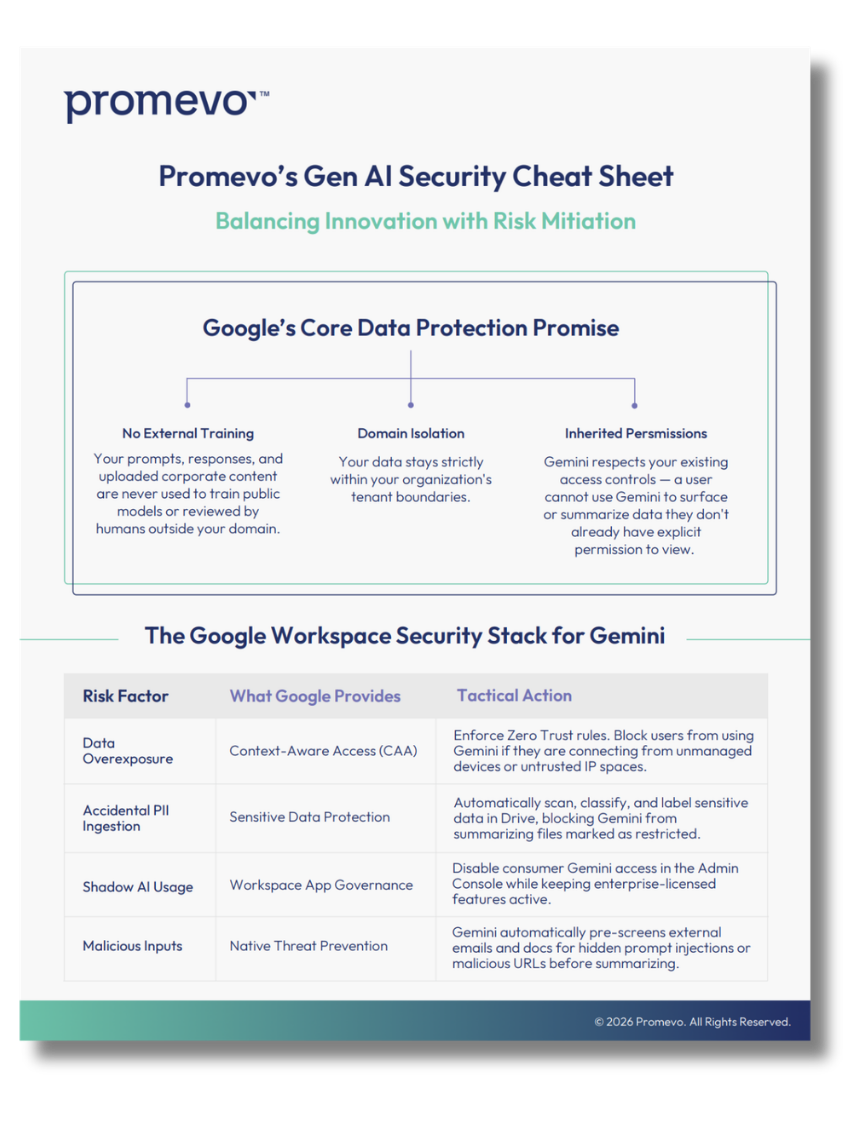
- Uncompromising Data Privacy: Keep your organization's interactions with Gemini within your domain. Your content is never used to train public models or reviewed by humans outside your organization.
- Robust Audit Logging: IT teams see how every team interacts with AI and ensure compliance with standards such as GDPR and HIPAA through fully transparent admin dashboards and logs.
- Policy Enforcement: Whitelist or block specific third-party connectors (e.g., SAP or Salesforce) to ensure every integration meets your company's security and compliance standards.
Data Professionals: From Writing Queries to Asking Questions
In the data world, Gemini is driving a fundamental shift: moving from the technical burden of writing queries to the intuitive power of asking questions in plain English.
This transition doesn't just speed up veteran analysts; it democratizes data access for business users who can now explore complex datasets without needing deep SQL or LookML expertise.
Gemini in BigQuery: Intelligent Data Engineering and Analysis
Gemini in BigQuery is a context-aware partner embedded directly in BigQuery Studio, helping you manage the entire data lifecycle from discovery to visualization.
- BigQuery Data Canvas: Discover, join, and query table assets using natural language. It visualizes your analysis as a directed acyclic graph (DAG), allowing you to see the data journey from source to the final chart.
- SQL & Python Assist: Generate entire code blocks from a natural language comment in the query editor or a notebook. For example, prompt it with "Calculate the average trip length by subscriber type," and it will generate the SQL for you.
- Code Completion and Explanation: Reduce keystrokes as you type with Gemini’s real-time suggestions. If you encounter a complex legacy query, ask Gemini to explain its logic in plain English and suggest optimizations such as partitioning and clustering to reduce query costs.
- Automated Data Insights: Automatically scan your table metadata to uncover hidden patterns and suggest insightful questions you might not have thought to ask.
Gemini in Colab: The Agentic Data Science Partner
Google Colab has been reimagined as an AI-first environment where Gemini functions as a pair programmer and automated analyst for end-to-end workflows.
- Data Science Agent (DSA): This agent can autonomously plan and execute a complete analytical task. For instance, you can ask it to "Train a model to predict income bracket from this table," and it will generate a multi-step plan covering data cleaning, feature engineering, model training, and evaluation.
- Iterative Error Fixing: When a cell fails, Colab doesn't just show an error; it explains the cause and provides a "Fix" button that generates the corrected code in a clear diff view for your approval.
- Conversational Visualization: Instead of wrestling with libraries like Matplotlib or Seaborn, you can simply ask Colab to "Graph the top 20 results using a bar graph," and it will generate the perfectly labeled visualization.
- Notebook Refactoring: Describe broad changes in natural language — such as "Refactor this monolithic function into smaller, more modular parts" — and the agent will identify the relevant code blocks and suggest the modifications.
Gemini in Looker: Lowering the Barriers to BI
Gemini in Looker focuses on making business intelligence accessible to everyone, ensuring that non-technical leaders can get the answers they need without waiting on a data team.
- Conversational Analytics (Explore Assistant): This feature allows business users to chat with their data. Ask a question such as "How does this year's revenue compare to last year?" and Gemini will return Looker Studio charts or data tables instantly.
- LookML Assistant: Developers accelerate data modeling by generating LookML measures and dimensions from natural language descriptions, helping to build out a governed semantic layer faster.
- Visualization Assistant: Enable professional-grade design without manual coding by customizing formatting and complex JSON configurations for charts using prompts like "Change axis to log axis" or "Make this a custom heat map.”
- Dashboard Summarization: Analyze an entire Looker dashboard to get a written summary of key takeaways and trends, which can then be exported directly to Google Slides for a presentation.
- Deep Research: Automatically scan hundreds of websites to create detailed cited reports — a massive win for data teams doing market analysis and exclusive to Enterprise plans.
Cloud Architects: The AI "Architect in the Room"
For Cloud Architects, Gemini shifts the focus from purely managing infrastructure to high-level design, optimization, and security. It acts as a context-aware technical partner — essentially the "Architect in the room" — that understands your specific Google Cloud footprint to help you build more resilient and cost-effective environments.
Gemini Cloud Assist: Intelligent Infrastructure Management
Gemini Cloud Assist provides AI-powered guidance throughout the entire application lifecycle, from goal-driven design to real-time troubleshooting.
- Goal-Driven Architecture Design: Describe your desired design outcome in plain English — such as "Build a highly available web app with global load balancing" — and Gemini can generate architecture configurations and even Terraform code tailored to your specific needs.
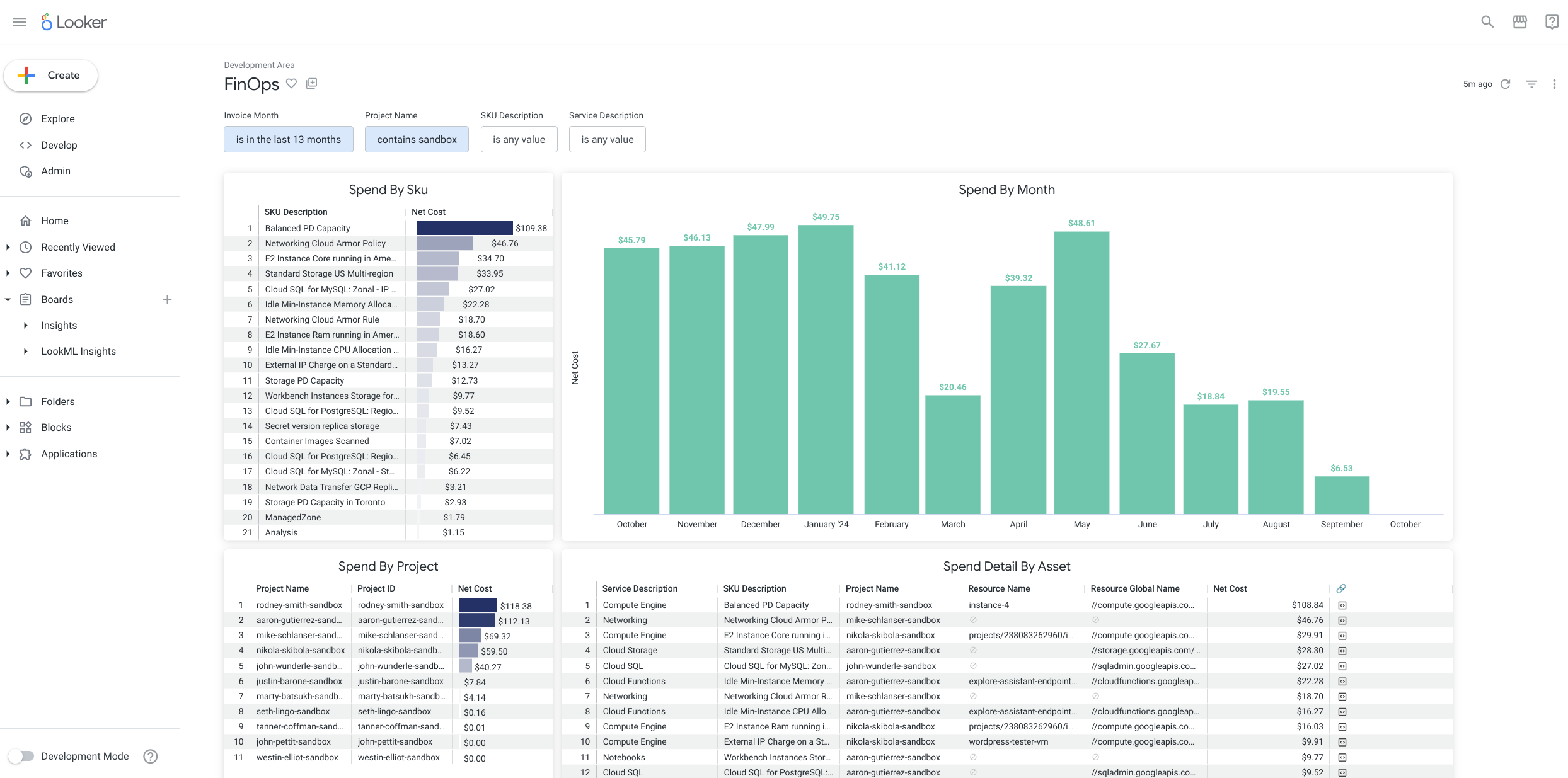
- Cost Optimization (FinOps): Identify waste by finding idle resources and providing personalized recommendations to maximize your ROI. Gemini can even draft emails or ticketing reports to help your FinOps team collaborate on these savings.
- Health & Security: Use Investigations to correlate logs and pinpoint root causes; distinguish between Google-side outages and internal errors; identify vulnerabilities; and simplify IAM by diagnosing "permission denied" errors and recommending precise, least-privilege roles.
- Network Intelligence: Use natural language queries in the Network Intelligence Center to analyze complex VPC flow logs, helping you visualize traffic patterns and troubleshoot connectivity without writing manual SQL.
Gemini in Databases: Modernizing and Managing at Scale
Gemini in Databases simplifies the management of your entire data fleet and accelerates the transition to cloud-native, modern versions.
- Database Center Fleet Management: Get a unified view of your Cloud SQL, AlloyDB, Spanner, Bigtable, and Firestore instances. It proactively flags issues related to availability, data protection, and performance across your entire fleet.
- AI-Assisted Migrations: Significantly reduce manual migration time using Database Migration Service to examine and convert legacy database code — such as stored procedures and triggers from SQL Server — into a PostgreSQL-compatible dialect.
- Performance Optimization: In Database Studio, Gemini provides intelligent recommendations to improve database performance. It helps troubleshoot high load or slow queries by explaining nuanced concepts like wait events and database flags in the context of your specific workload.
- Natural Language Database Operations: Ask questions about your fleet health, such as "How many of my Postgres 13 databases are affected by security issues?" and receive instant, actionable answers.
Strategic Adoption Tips: The Promevo Perspective
While Google provides the tools, Promevo provides the roadmap. Deploying AI at scale is a fundamental shift in how people work, and it requires a strategic approach rather than a technical toggle.
- Deploy in Phases: Don't flip the switch for everyone at once. Segment your rollout by department or use case to gather feedback and refine governance.
- Create Prompting Standards: Develop a standardized framework (Persona, Task, Context, Format) to help your team get the most out of every interaction.
- Use Data to Prove ROI: Track metrics like time-to-draft reduction and quality ratings to prove the business impact of your AI investment.
As of 2025, Gemini is included in all Google Workspace Business and Enterprise plans at no additional cost. This means AI-enhanced productivity — which users report saves an average of 105 minutes per week — is now a standard feature of your existing stack.
Schedule a 1:1 consultation with a Promevo expert to help you identify the best Gemini entry point for your specific business goals.
FAQs: The Google Gemini Ecosystem
1. What is the difference between Google Workspace with Gemini and Gemini Enterprise?
While both leverage Google’s latest models, they serve different operational roles. Google Workspace with Gemini acts as an embedded productivity sidekick within apps like Gmail and Docs to assist with writing, summarizing, and designing.
Gemini Enterprise is a standalone, agentic platform designed to be the new front door for AI in the workplace. It allows teams to build and govern custom AI agents that can synthesize proprietary data from across disparate systems — including third-party platforms like Salesforce and SAP — to automate entire cross-functional workflows.
2. Does Google use my business data to train Gemini models?
No. With Gemini Business, Standard, and Plus editions, your organization retains full ownership of its data. Your prompts, generated responses, and uploaded files are not used to train Google’s public models or those of other customers.
Furthermore, your interactions stay within your organization, automatically applying your existing Google Workspace security, privacy, and compliance policies.
Note: Data usage for model training only occurs in the free "Starter" edition offered after a trial, and even then, users can opt out in settings.
3. What are the primary benefits of "contextual intelligence" for my team?
Contextual intelligence allows Gemini to move beyond generic responses and act as an expert with local knowledge of your organization.
For example, Gemini in BigQuery understands your specific data schemas to generate accurate SQL, while Gemini Code Assist analyzes your private code repositories to offer relevant debugging advice.
By grounding its intelligence in your enterprise's truth data, Gemini reduces hallucinations and provides fact-based answers with clear source attribution.
4. Who should choose the Gemini Enterprise edition over the Business edition?
Gemini Enterprise (Standard and Plus editions) is specifically designed for larger organizations or those in regulated industries with stricter security, compliance, and scale requirements. Key differentiators include higher usage quotas for active developers, advanced administrative oversight via the Agent Hub, and deeper integration with security tools like audit logging and document-level permissions.
It is the ideal choice for businesses looking to transition from simply "using AI" for tasks to "building AI" through custom agentic workflows.